AI & automation · Top Rated on Upwork

AI that does real work,
not just demos.

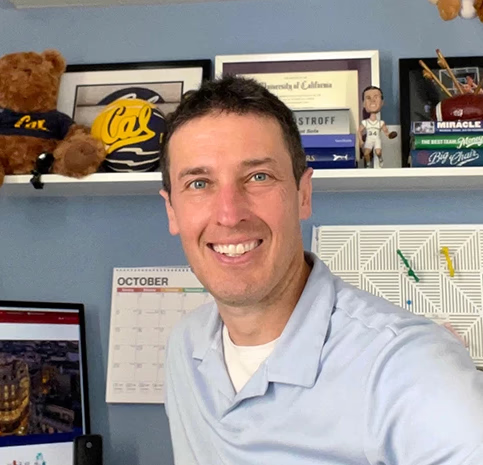
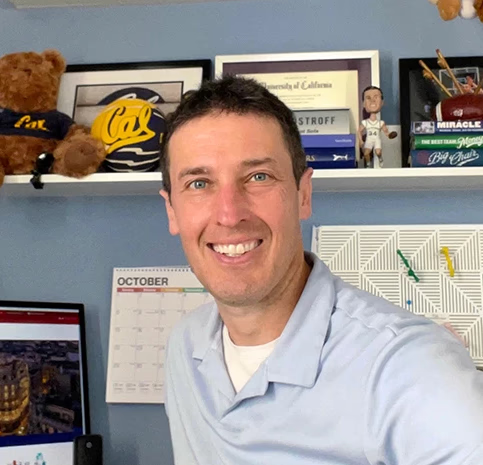
I'm Nick Ostroff, founder of Pixelocity and a Top Rated freelancer on Upwork with a 100% Job Success score across 132 jobs. I build my own AI tools with Claude Code and run them in my business every day. Find the kind of help your job post asks for below, then let's talk on a free 30-minute call.

Top Rated on Upwork●100% job success●132 jobs completed●Manhattan Beach, CA

A quick hello

Thanks for stopping by.

A quick hello from me: who I am, and why a free 30-minute call on Google Meet or Zoom is the best next step. It lets us both see if it's a good fit.

Book a 30-minute call

The receipts

A track record you can verify.

Every number below is on my public Upwork profile — earned one client at a time. No agency middlemen, no account reps. You work directly with me.

100%

Job Success

$70K+

Total earned

132

Jobs completed

101

Hours worked

In their own words

What clients say.

“Communication was top class with Nick. Impeccable skills and knowledge about Google Ads and Analytics.”
— Upwork client review
“Nick was very helpful in giving us an audit of our Google ads and helping us refine one of our campaigns to perform much better than before. That particular ad cut our cost per conversion in half! I would highly recommend working with Nick for Google Ads.”
— Upwork client review
“Nick was the perfect fit for what we were looking for in a Google Ads & SEM Freelancer. He was flexible in his approach – both hands-on and taking more of a coaching/training role so that we could learn some of the ins and outs to manage our own campaigns in the future. He provided super helpful training videos, provided great insider tips and tricks, and helped get everything set up properly in the backend with both Ads and Analytics to ensure we were set up for success. Can’t recommend his services enough!”
— Upwork client review

See for yourself

Hear it straight from clients.

Real business owners, in their own words — what working with me actually looks like.

Prefer a quick intro? Watch my 2-minute video →

Put Claude to work

Claude for your business

Sound familiar?

  • “You've heard Claude can do real work, but you're not sure where to start.”
  • “Your team uses Claude in a chat window and copies the results around by hand.”
  • “You want Claude connected to the tools you already use.”

How I start

  1. 01Find the one task that eats the most hours each week.
  2. 02Connect Claude to the tools it needs, like Google Ads, your CRM or your documents.
  3. 03Build it in small steps you can check, with a person approving anything that goes out.
  4. 04Show your team how to run it themselves.

Questions clients ask

Have you built with Claude yourself?

Yes. I build my own tools with Claude Code, including my CRM and an ads operations app, and I built a custom Claude connector into clients' Google Ads accounts.

Will Claude do things without asking us?

Only what we decide together. Anything that sends, spends or publishes waits for a person to approve it.

Do we need a developer?

Usually not for a first version. A lot of useful setups are connectors, skills and scheduled tasks, not custom software.
Make my GPT work

ChatGPT & OpenAI

Sound familiar?

  • “You built a custom GPT and it's not quite doing what you need.”
  • “You want the OpenAI API behind a real workflow, not just a chat window.”
  • “You're not sure whether ChatGPT or Claude is the better fit.”

How I start

  1. 01Look at what you're asking it to do and where it falls short.
  2. 02Tighten the instructions, examples and data it works from.
  3. 03Connect it to where the work actually happens.
  4. 04Compare tools honestly. Sometimes the answer is a different one.

Questions clients ask

Do you only work with Claude?

No. I'll recommend whichever tool fits the job, and tell you if that isn't the one you started with.

Can you fix our custom GPT?

Most problems come from vague instructions, missing examples or the wrong data. Those are quick to test together on a call.

Build me an agent

AI agents

Sound familiar?

  • “You want something that works on its own, not another tool to babysit.”
  • “Leads, research or follow-ups pile up faster than your team can handle them.”
  • “You've seen agent demos and want one that holds up in real use.”

How I build

  1. 01Pick one job with a clear finish line.
  2. 02Build the agent to do it on a schedule, with checks at every step.
  3. 03Keep a person in the loop for anything that sends, spends or publishes.
  4. 04Watch it run for a few weeks and fix what breaks.

Questions clients ask

Have you built an agent that's still running?

Yes. I run my own every day: it scans new job posts, sorts them and drafts replies, and nothing goes out until I approve it on my iPad.

What happens when it gets something wrong?

Every step is logged and checked, and anything it isn't sure about comes to a person instead of going out.

Automate the busywork

Workflow automation

Sound familiar?

  • “New leads sit in an inbox until someone remembers to call.”
  • “Your team copies the same data between three tools every day.”
  • “Your CRM or GoHighLevel automations only half work.”

How I start

  1. 01Map how a lead or task moves today, step by step.
  2. 02Cut the manual hand-offs first.
  3. 03Use the tools you already pay for before adding new ones.
  4. 04Add AI only where it actually saves time.

Questions clients ask

Which tools do you use?

I start with what you already have, whether that's your CRM, Zapier, Make or Claude, and only suggest something new when it clearly pays off.

Is this a big developer project?

It shouldn't be. If it needs a full software build, I'll tell you that on the call.

AI on my ads

AI for marketing & ads

Sound familiar?

  • “Reporting takes hours every week and nobody reads it.”
  • “You want AI helping run your ad accounts, not just writing ad copy.”
  • “You're wondering how to show up when people ask ChatGPT and other AI assistants.”

How I start

  1. 01Connect AI to your real account data, not screenshots.
  2. 02Automate the weekly checks: wasted spend, broken tracking, budget pacing.
  3. 03Turn the numbers into a short, plain-English update.
  4. 04Keep every account change as a proposal a person approves.

Questions clients ask

Can AI run my Google Ads?

It can do a lot of the checking and drafting. I use it that way on client accounts, and a person reviews every change before it goes live.

Is AI-written ad copy any good?

It's a strong first draft. It still needs someone who knows your business to edit it.

Build me a tool

AI apps & chatbots

Sound familiar?

  • “You want a chatbot that actually answers questions about your business.”
  • “You need a simple internal tool, and off-the-shelf software doesn't fit.”
  • “You have an app idea and want to know if AI can help build it fast.”

How I build

  1. 01Start with the smallest version that's useful.
  2. 02Build it on your own data and rules.
  3. 03Test it with real questions before anyone outside sees it.
  4. 04Hand it over with notes so your team can run it.

Questions clients ask

What have you built?

My own CRM, an ads operations app and an iPad app that reviews job leads, all built with Claude Code.

How big is a first version?

We scope it on the call. I'd rather ship a small, useful version first than plan a big one.

Free 30-minute call

Pick a time that works for you.

No pressure, no subscriptions — just a clear read on where your digital marketing stands and the best way to move forward, together or on your own.

Nick Ostroff

You'll meet with Nick Ostroff, Pixelocity founder.

A quick read on where your marketing stands and whether we can help.

Checking live availability…

Prefer to talk now? Call 310-817-0265

Let's connect your dots.

Book the free 30-minute call above, or reach out directly. Either way, you'll get straight answers — even if the honest one is that you don't need me yet.

Schedule your free consult

or call 310-817-0265